Why your calls show "Spam Likely", and how to fix it
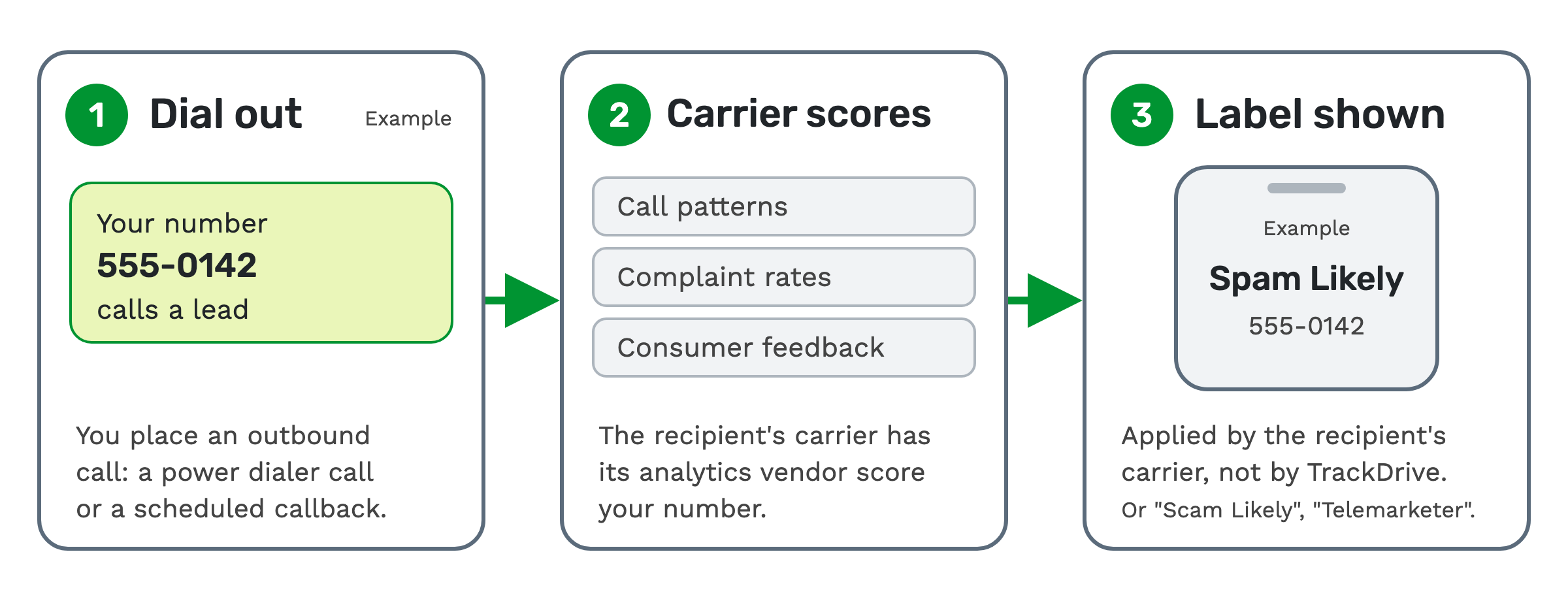
"Spam Likely" is a warning that can appear on someone's phone when you call them. It is added by the carrier of the person you're calling. TrackDrive doesn't add it, and neither does the provider that placed the call.
This page is about calls you place: power dialer calls, scheduled callbacks and other outbound calls to leads. If spam calls coming in are your problem, skip to the note near the end.
Who puts the label on your call
A carrier is the phone company of the person you're calling. Each US carrier contracts with a reputation analytics vendor, a company that scores phone numbers.
The vendor scores each number on its call patterns, complaint rates and consumer feedback. The label the person sees can read "Spam Likely", "Scam Likely" or "Telemarketer".
Each vendor keeps its own reputation database. That's why one number can be flagged on one carrier and clean on another.
What gets a number labeled
TrackDrive's help article on spam labels names four behaviors most likely to trip a spam classifier. A spam classifier is the scoring system that decides whether a number looks like spam.
- High outbound volume from a single number. Many calls go out from one number.
- Short call durations. Calls that end quickly suggest hang-ups.
- Low answer rates. Few people pick up.
- Direct consumer complaints. People report the number through their carrier or the carrier's reporting app.
Every outbound call is signed with STIR/SHAKEN
STIR/SHAKEN is a way to sign a call so its caller ID can be checked. A signed call tells the receiving carrier that the caller has been verified and is authorized to use the number.
Every outbound call placed through TrackDrive is signed with STIR/SHAKEN by its carrier partners. The verified identity page says this means fewer of your calls are flagged as spoofed. A spoofed call is one with a faked caller ID.
On TrackDrive's verified identity page, this signature is "Verified Caller ID". It comes with every outbound call. Verified branded caller ID, your business name on the screen, is part of spam tag mitigation. You turn that on number by number.
Your verified business identity
Every TrackDrive customer completes a KYC check with Stripe Identity. KYC means "know your customer": a check that you are who you say you are.
Outbound schedule calls, SMS and email need one more step: a one-time KYB Business Compliance Profile. KYB means "know your business": it records who your business is in law.
The profile holds your EIN, legal name and address, encrypted. An EIN, or Employer Identification Number, is a US business's tax ID.
You also sign attestations: signed statements about how you call. They cover DNC scrubbing, honoring unsubscribes, calling within legal hours and accurate caller ID. Change that data, and you certify it again.
This identity is what lets your numbers be registered. It's how spam tag mitigation registers and brands your numbers with the carriers.
The name on file for your number (CNAM)
CNAM, or caller ID name, is the name carriers keep on file for your number. In TrackDrive, each supported tracking number can carry its own CNAM of up to 15 characters.
You set it on the number, inline on the numbers grid, or across a whole block with a bulk update. A single spreadsheet upload can change it across thousands of numbers.
TrackDrive registers the name upstream and reports back whether it took. Beside each number you see whether the name is live upstream, and when it last changed.
Dealing with "Spam Likely" labels is a separate job. For that, and for verified branded caller ID, the call tracking page's CNAM section points to spam tag mitigation.
How spam tag mitigation works
Spam tag mitigation is TrackDrive's feature for branded caller ID and carrier registration. You switch it on per number.
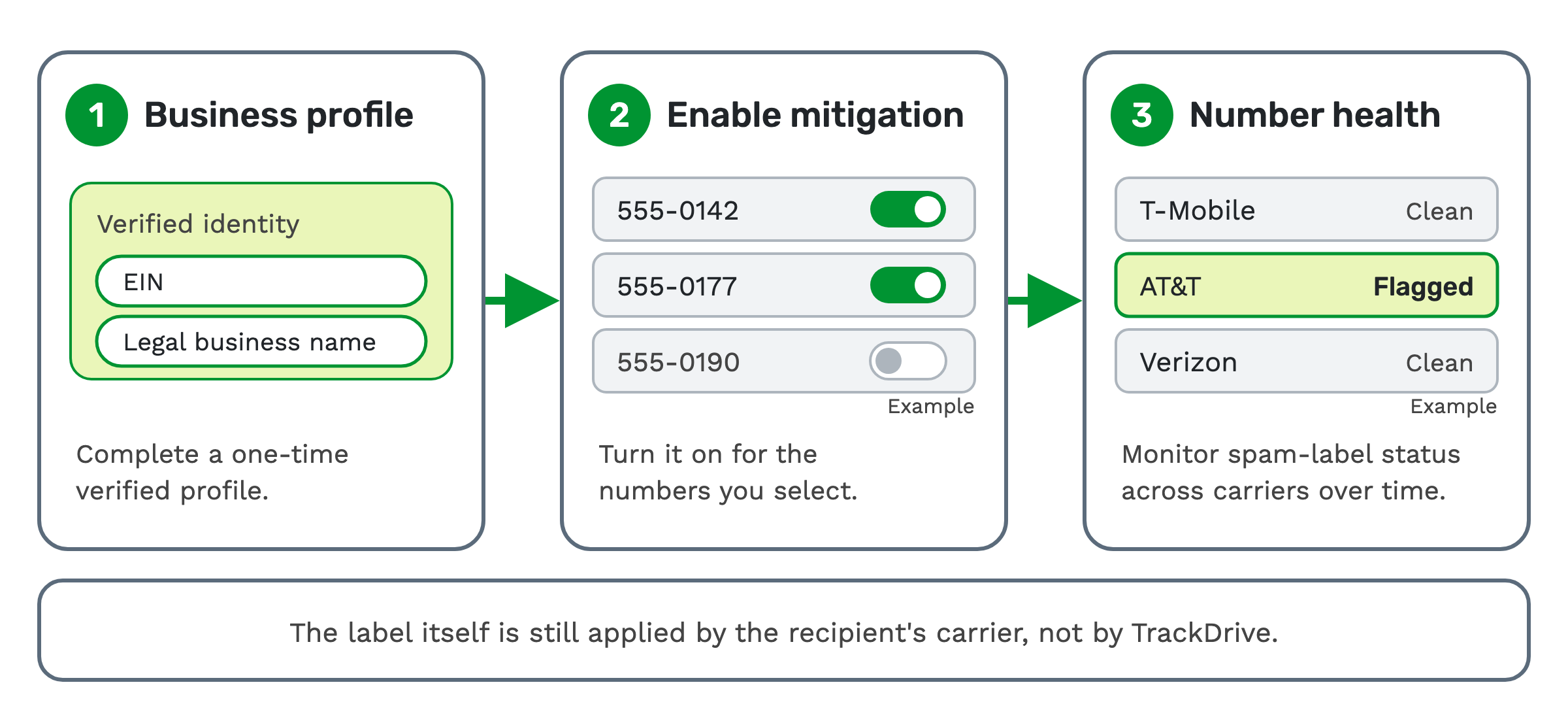 1. Business profile. Complete a one-time verified profile.
2. Enable mitigation. Turn it on for the numbers you select. The help article's advice is to enable it on numbers used for outbound dialing.
3. Number health. Monitor spam-label status across carriers over time.
The help article says setup takes minutes, and TrackDrive handles the rest. It has three parts.
Carrier registration. TrackDrive registers your numbers with the carriers and the analytics providers behind spam labeling. Your verified business identity backs it: EIN and legal business name. This is the step that lets the carriers drop a spam label. It doesn't guarantee they do, and there's no separate removal step on TrackDrive's side.
Branded caller ID. You set a Branded Name on each toll-free or local number, so recipients see who is calling.
Number-health dashboard. It shows your overall spam rate and which numbers are flagged. It also shows how each major carrier (T-Mobile, AT&T and Verizon) labels your lines, so you can spot problems early.
The outbound rules are still yours
Consumer complaints are one of the four triggers above. Consent on every dialed lead is the job of the company sending the calls.
TrackDrive gives you calling windows per schedule, per-lead suppression and consent fields on incoming leads. It does not pre-check leads against the federal Do Not Call registry, so scrub your lists before import.
The outbound dialing article covers the rules. These tools don't, on their own, guarantee compliance. The TCPA, the US Telephone Consumer Protection Act, and other calling laws still apply to you.
A note on spam calls coming in
Spam calls coming in are a different problem, with other tools. On offers with blacklist rejection turned on, a company-wide blacklist blocks the caller. Each buyer's suppression list is checked before a call is forwarded.
See how to route inbound calls for where those checks sit.
What it costs on TrackDrive
Spam tag mitigation is a monthly rate per number. It covers carrier registration and branded caller ID. Commit plans lower it.
Branded caller ID adds a small per-branded-call fee when a Branded Name is set. Your rate sheet lists it; the public pricing page doesn't. A number with no Branded Name pays no per-branded-call fee.
Outbound calls to consumers have a per-minute rate. Your rate sheet sets the billing increment and minimum billable duration for those calls. Each phone number has a monthly rate.
There's no onboarding fee. See TrackDrive pricing for every commit level.
Questions people ask
Does TrackDrive put "Spam Likely" on my calls? No. The label is applied by the recipient's carrier, not by TrackDrive and not by the provider that placed the call.
Why is my number flagged on one carrier but clean on another? Each carrier's vendor keeps its own database. The number-health dashboard shows how T-Mobile, AT&T and Verizon each label your lines.
What does verified caller ID mean? A STIR/SHAKEN signature tells the receiving carrier the caller is verified and authorized to use the number. Every outbound call placed through TrackDrive is signed by its carrier partners. Spam tag mitigation adds verified branded caller ID: a Branded Name, so the person sees who is calling.
Is CNAM the same as branded caller ID? No. CNAM is the name carriers keep on file for your number, up to 15 characters. Branded caller ID is part of spam tag mitigation: a Branded Name on each toll-free or local number.
Can a spam tag be removed? The carrier that applied it can drop it. TrackDrive registers your business and each number with the carriers, the step that lets them do that. It doesn't guarantee they do. The four triggers above are still what the help article says trips a spam classifier.
Which numbers should I turn it on for? The numbers you dial out from. If you also call leads fast after a form fill, see speed to lead.
See it in action
Request a demo for a live walkthrough tailored to your use case, or start free, with no credit card and no onboarding fee.